


Something extraordinary is unfolding
How to Use INFINITI Connected Features Every Day

A cold Ohio morning is easier when you can start your vehicle before leaving for work. On another day, checking its parking location or getting an unlocked-door alert can save time and worry. INFINITI connected features can support remote access, vehicle awareness, comfort, and basic safety during ordinary driving.
These tools are part of the INFINITI InTouch platform, with availability varying by model, trim, and model year, including the QX50, QX60, and QX80. Availability also depends on your Subscription, smartphone, cellular coverage, and vehicle equipment. Start with the right setup, then build habits that keep the technology useful and secure.
Key Takeaways
Set up the MyINFINITI app, pair your vehicle, enable necessary permissions, and confirm your trial or subscription status.
Available connected features vary by model, trim, model year, equipment, subscription, and cellular coverage, so check your owner's manual and account before relying on a feature.
Use remote start, Vehicle Status, parking location, Destination Send-to-Car, and alerts carefully, and never use remote start in a closed garage.
Protect your account with a strong password, secure your phone, sign out of shared devices, and remove personal data before selling or trading the vehicle.
Connected features support daily ownership but do not replace safe driving, normal vehicle checks, direct control, or emergency services.
How to Set Up INFINITI InTouch for Daily Driving
First, confirm your vehicle supports INFINITI InTouch Services. Download the official MyINFINITI app, then create an account or sign in with the email address and phone number connected to your vehicle purchase or owner profile.
Next, pair the vehicle by following the app and touchscreen prompts. Accept permissions needed for notifications and location services, then confirm whether your vehicle has an active trial or subscription. Enrollment, owner consent, a PIN, and a subscription agreement may be needed for certain services.
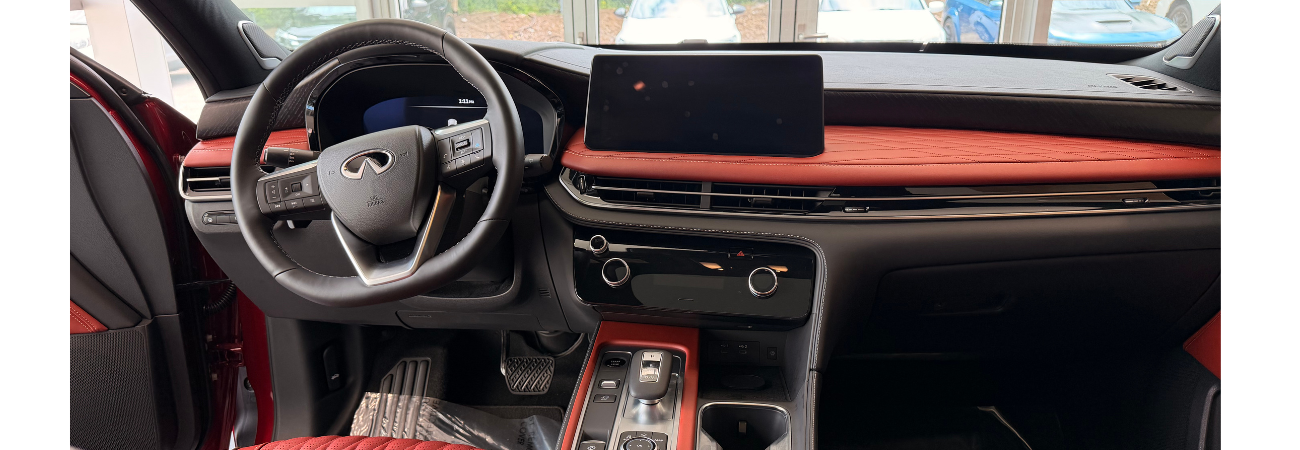
Available INFINITI connected services, also called Connected Services, can include navigation support, remote features, security tools, and service reminders. In-Vehicle Technology may include equipment such as a Wi-Fi Hotspot, SiriusXM, or a Connected Garage Door Opener. Keep the app and vehicle software updated when prompted. Menus differ by vehicle, so a dealership can also help activate eligible services during a sales or service visit.
Use the app before and after ordinary trips
Before leaving, check fuel level or battery status if your INFINITI supports it. You may also confirm that doors are locked, view the vehicle's parking location, or use Destination Send-to-Car when available.
Vehicles with Google built-in may provide Google Maps, Google Assistant, and Google Play through the Infotainment Screen.
After parking, checking Vehicle Status can offer peace of mind in a busy lot or airport garage. Response time may vary with cellular coverage and an active connected-services plan.
Protect this convenience by signing out of shared phones and tablets. Keep your account password private, and don't store it in a note that others can easily open.
Know which features your INFINITI actually supports
Don't assume every INFINITI has the same remote controls or alerts. Check the model year, trim, owner's manual, in-vehicle touchscreen, and your INFINITI owner account before relying on a feature.
App controls, touchscreen tools, and paid connected-services plans are separate categories. For example, some functions may work only through the app, while others require an active subscription after a trial period ends.
A newer vehicle may have different equipment than an earlier version of the same model. Equipment can also vary between models, including the QX50 and QX60. Even different QX60 model years may not have identical features. Review your vehicle's details instead of comparing it to a friend's INFINITI.
Use Remote Start and Alerts Without Guesswork
When equipped, remote start through INFINITI InTouch Remote Services can help prepare the cabin before a commute. In the MyINFINITI app, open the vehicle controls, choose remote start, review the confirmation, and wait for the status update before heading outside.
Remote Engine Start/Stop with Climate Control is available on eligible vehicles. However, climate settings, engine run time, and restart limits vary by model. Never use remote start in a closed garage. Park outdoors with clear exhaust flow, follow local laws, and still lock the vehicle as you normally would.
Alerts can also flag supported status changes, including an unlocked door, alarm event, low fuel, or maintenance need. They’re helpful reminders, not a replacement for paying attention to your vehicle.
Build useful alert habits
Turn on the notifications that matter most to you. Door-lock and maintenance alerts often make sense for daily ownership, while excessive notifications can make you ignore the important ones.
If alerts stop arriving, check your phone's notification permissions, internet connection, app settings, and account status. Weak cellular service, a low vehicle battery, an inactive subscription, or a system issue can delay or prevent a message. Maintenance Alerts deserve prompt attention, even when the vehicle still seems to drive normally.
Use the alert as a reason to check the owner's manual or schedule service, rather than letting the notification sit unread.
What to do when remote commands do not work
Start by moving your phone to a stronger signal. Confirm that the vehicle is outdoors, in the correct operating condition, and that its doors, hood, and trunk are fully closed.
Then restart the app, verify the correct account is signed in, and confirm that your subscription remains active. Wait a few minutes before trying again. Repeated commands can create confusion without fixing a coverage or account issue.
If the problem continues, contact the service team at your local INFINITI dealership. They can help check account activation, software needs, and vehicle conditions that may require inspection.
Safety Basics for Connected Vehicle Owners
Connected features add useful support, but they don't replace safe driving, direct vehicle control, or emergency services. Driver-assistance technology, including ProPILOT Assist 2.1, still requires your full attention. Set destinations, adjust app controls, and review notifications before putting the vehicle in gear.
Keep the phone out of your hands while driving. If an alert arrives on the road, wait until you are safely parked before opening the app. Automatic Collision Notification and, where available, Emergency Call depend on vehicle equipment, setup, an active plan, and cellular coverage. Always know how to call 911 directly.
Protect your account and personal information
Use a strong, unique password for your INFINITI account. Secure your phone with a passcode, fingerprint, or face recognition, and avoid sharing account access unless it is necessary.
Before selling or trading your vehicle, remove saved destinations, paired devices, and personal account data. Review who has permission to access the app, especially if family members or former drivers used the vehicle.
INFINITI InTouch services may offer Roadside Assistance and connectivity support. Still, account security remains your responsibility.
Keep the system ready with regular checks
Once a month, check the app and Infotainment Screen to confirm notifications, account details, connected-services status, and subscribed services such as SiriusXM are current. Check the vehicle battery, too, because a weak battery can affect connected functions.
Read your owner's manual for model-specific limits, including whether Over-the-Air Updates are supported. A dealership can answer questions about software updates, subscription changes, feature demonstrations, and maintenance needs.
In-Vehicle Technology can fail, so continue normal safety practices. Carry your key, lock the vehicle, watch for hazards, and don't depend on an app as your only source of vehicle information.
Frequently Asked Questions
What are INFINITI connected features?
INFINITI connected features are tools available through the INFINITI InTouch platform and MyINFINITI app. Depending on the vehicle, they may include remote controls, Vehicle Status, parking location, alerts, navigation support, and service reminders.
Does every INFINITI support the same connected features?
No. Availability varies by model, trim, model year, vehicle equipment, subscription, smartphone, and cellular coverage. Check your owner's manual, in-vehicle touchscreen, and INFINITI owner account for the features supported by your vehicle.
How do I use remote start through MyINFINITI?
Open the vehicle controls in the MyINFINITI app, choose remote start, review the confirmation, and wait for the status update. Remote Engine Start/Stop with Climate Control is available only on eligible vehicles, and you should never use remote start in a closed garage.
Why are my INFINITI connected-service alerts or commands delayed?
Weak cellular service, a low vehicle battery, an inactive subscription, incorrect app permissions, or a system issue can delay alerts and remote commands. Check your connection, app settings, account status, and vehicle conditions, then contact an INFINITI dealership if the problem continues.
How can I keep my INFINITI connected account secure?
Use a strong, unique password and secure your phone with a passcode, fingerprint, or face recognition. Sign out of shared devices, review app permissions, and remove saved destinations, paired devices, and personal account data before selling or trading your vehicle.
Make Connected Features Part of a Safer Routine
A useful routine is simple: set up the app correctly, learn the INFINITI connected features your vehicle supports, use remote start and alerts carefully, and protect your account. These steps make the technology more dependable during daily driving.
Drivers near Dayton can visit Evans INFINITI of Dayton for a connected-services demonstration, activation help, troubleshooting, maintenance, or assistance comparing eligible features for a new QX60 model. The right setup makes every available feature easier to use with confidence.